

Why Mobile-First UX Matters in 2026
Mobile-first UX design centers on creating digital experiences for mobile devices first, then adapting them for larger screens.
In 2026, mobile-first is essential because most users engage with brands on mobile devices before desktops.
Search engines, AI search systems, and modern user behavior all prioritize mobile usability.
Businesses that fail to implement mobile-first UX risk losing visibility, engagement, and conversions.
At yourcloudhub, we emphasize a mobile-first strategy because it influences not only user experience but also SEO performance, AI visibility, and revenue growth.
The Evolution of Mobile-First Thinking
Mobile optimization used to mean adapting a desktop site for smaller screens.
Today, the approach is reversed.
Modern UX strategy begins with mobile design and then expands to tablet and desktop experiences.
This shift is driven by: dominant mobile traffic, mobile-first indexing by search engines, AI evaluating mobile usability, user expectations for quick loading and simple navigation, and mobile devices as primary access points. Designing for desktop first creates friction.
Mobile Behavior in 2026
Understanding mobile behavior is essential before designing mobile experiences.
Mobile users approach digital content differently than desktop users do.
Mobile users typically scan, use one hand, expect fast load times, rely on touch gestures, and make quick decisions.
Browsing on mobile devices often occurs during short periods of attention.
People search while commuting, waiting, or multitasking.
To design effective experiences, UX strategies must adapt to these mobile realities.
At yourcloudhub, the mobile UX strategy focuses on reducing cognitive effort while delivering immediate clarity.
Why Mobile-First UX Impacts SEO
Search engines now evaluate websites using mobile-first indexing.
This means search algorithms analyze the mobile version of a website before considering the desktop version.
Negative impacts of poor mobile UX include lower search rankings, reduced page engagement, higher bounce rates, and weaker conversion performance.
Google and other search systems prioritize pages that deliver fast, accessible mobile experiences.
AI-driven search models also rely on structured, readable mobile layouts to interpret content effectively.
Mobile UX, therefore, influences both discoverability and user trust.
The Core Principles of Mobile-First UX Design
Strong mobile UX follows several foundational principles.
When making decisions on layout, navigation, and content structure, these core principles guide the approach.
Clarity
Speed
Simplicity
Accessibility
Touch-friendly interaction
Each of these elements contributes to a seamless user journey.
When implemented correctly, mobile design improves both user satisfaction and marketing performance.
Speed as the First UX Priority
Quick abandonment of slow websites is common among mobile users.
Studies consistently show that loading delays dramatically increase bounce rates.
Speed optimization should use compressed images, minimal scripts, efficient code, optimized hosting, and lazy loading.
At yourcloudhub, speed optimization is one of the first areas addressed in mobile UX audits.
Fast experiences increase engagement and conversion potential.

Simplified Navigation
Intuitive navigation remains essential on mobile devices.
Often, large menus designed for desktops perform poorly on smaller screens.
Effective mobile navigation uses clear icons, limited main options, logical hierarchy, and sticky bars.
Reducing navigation complexity helps users find information quickly.
Mobile UX should prioritize essential actions rather than presenting every option simultaneously.
Touch-Friendly Interface Design
Unlike desktop devices, mobile interfaces rely on touch.
This requires larger interactive elements.
Ensure buttons are tappable, spacing prevents errors, forms are easy to use, and scrolling is smooth.
Touch-friendly design reduces frustration and increases usability.
When interaction becomes effortless, users remain engaged longer.
Content Structure for Mobile Readers
Mobile users rarely read long paragraphs.
Instead, they scan information quickly.
Content must use short paragraphs, clear titles, lists, and spacing to boost readability.
At yourcloudhub, we structure mobile content to match scanning behavior rather than traditional reading patterns.
Clear structure benefits both users and AI search systems.
Visual Hierarchy and Screen Prioritization
Mobile screens have limited space.
Every element must serve a clear purpose.
Important content should appear immediately within the visible screen area.
This area, often referred to as the “above-the-fold” section, should communicate:
What the business offers
Why it matters
What action users should take next
A strong visual hierarchy ensures users understand the value within seconds.
Forms Designed for Mobile Completion
Forms are critical conversion points.
Poor mobile form design significantly reduces completion rates.
Best practices: few input fields, auto-fill, big boxes, clear errors. Simple forms mean higher completion.
Mobile-First Design and Conversion Optimization
Mobile UX directly influences conversions.
If users encounter friction such as:
Slow loading
Difficult navigation
Unreadable text
Confusing forms
They leave before taking action.
Good mobile design increases engagement, leads, purchases, and bookings.
At yourcloudhub, we approach mobile UX as both a usability challenge and a conversion strategy.
Accessibility in Mobile UX
Accessibility is an essential component of modern UX.
Mobile accessibility needs readable text, contrast, voice navigation, and screen reader support.
Accessible mobile design ensures that all users can comfortably interact with a website.
Accessibility improvements also strengthen SEO performance.
Search engines favor websites that prioritize usability and inclusivity.
Mobile UX and Brand Trust
Users often judge credibility based on mobile experience.
If a website loads slowly or feels confusing, users may question the business’s reliability.
Professional mobile UX signals competence.
It communicates that the company invests in quality digital experiences.
At yourcloudhub, we often see that improving mobile usability significantly strengthens brand perception.
Integrating Technology With UX Strategy
Effective mobile UX requires collaboration between multiple technical disciplines.
Strong Website development, Software development, and Digital marketing integration ensure that design decisions align with performance, functionality, and marketing goals.
UX design cannot operate independently.
Technical infrastructure must support the intended user experience.
When teams collaborate effectively, mobile platforms become faster, clearer, and more scalable.
Preparing for AI-Driven Search Interfaces
AI search systems increasingly summarize and display website information directly within search interfaces.
Mobile-first UX plays an important role in this process.
Content that is clearly structured and easy to interpret performs better in AI summaries.
Mobile-optimized layouts also improve machine readability.
At yourcloudhub, we build UX strategies that align with both human users and AI interpretation systems.
The Strategic Importance of Mobile-First Thinking
Mobile-first design is no longer a design preference; it’s a necessity.
It is a strategic necessity.
Businesses that ignore mobile usability face:
Lower search visibility
Higher bounce rates
Reduced conversions
Weak brand perception
In contrast, companies that prioritize mobile experiences benefit from stronger engagement and more sustainable growth.
Mobile design is now the foundation of digital performance.
Mobile UX Defines Digital Success
The digital landscape continues evolving toward mobile interaction.
Consumers expect:
Fast experiences
Simple navigation
Clear content
Seamless interactions
Businesses that embrace mobile-first UX create stronger digital ecosystems.
At yourcloudhub, we help organizations design mobile experiences that improve visibility, usability, and conversions simultaneously. Contact us today to discover how we can elevate your mobile UX and drive real results for your business.
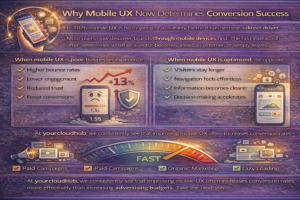
Why Mobile UX Now Determines Conversion Success
In 2026, mobile UX is no longer just a usability factor. It has become a direct driver of revenue.
Most users now discover brands through mobile devices first. The first interaction often determines whether a visitor becomes a lead, a customer, or simply leaves.
When mobile UX is poor, businesses experience:
Higher bounce rates
Lower engagement
Reduced trust
Fewer conversions
When mobile UX is optimized, the opposite occurs.
Visitors stay longer.
Navigation feels effortless.
Information becomes clearer.
Decision-making accelerates.
At yourcloudhub, we consistently see that improving mobile UX often increases conversion rates more effectively than increasing advertising budgets. Take the next step—partner with us to enhance your mobile experience and boost your results.
The Mobile Attention Window
One of the most important concepts in mobile UX is the attention window.
Mobile users often give a website only a few seconds to prove relevance.
During this short window, visitors expect three questions to be answered immediately.
What is this website about
Why should I care
What should I do next
If these answers are not clear on the first screen, users leave.
This is why mobile-first UX design must prioritize clarity above all else.
At yourcloudhub, we structure mobile layouts so that value propositions appear immediately without requiring scrolling. Let us help you optimize your mobile presence for instant user engagement—contact our team to get started.
The Thumb Zone Principle
Mobile interactions are primarily controlled by the thumb.
Designers must consider the natural range of motion of a user’s thumb when placing navigation and interactive elements.
Research shows that certain screen areas are easier to reach than others.
Elements placed in comfortable thumb zones improve usability.
Buttons placed too high on the screen often create friction.
Effective mobile UX considers:
Button placement
Gesture interaction
Scroll flow
Tap accuracy
When interfaces align with natural hand movement, users interact more comfortably.
Scroll-Based UX Design
Scrolling is the primary interaction method on mobile devices.
Instead of forcing users to navigate between many pages, modern UX design often uses scroll-driven experiences.
This approach allows information to flow naturally.
Content should appear progressively as users move through the page.
Important design strategies include:
Clear section transitions
Consistent spacing
Visual anchors
Contextual calls to action
Scroll-based storytelling keeps users engaged while maintaining clarity.
At yourcloudhub, we often structure landing pages around scroll flow rather than complex navigation paths.
Progressive Disclosure in Mobile UX
Mobile screens have limited space.
Displaying too much information at once overwhelms users.
Progressive disclosure solves this problem by revealing information gradually.
Instead of presenting every detail immediately, mobile UX can:
Show summaries first
Provide expandable sections
Offer deeper explanations when requested
This approach reduces cognitive load while keeping content accessible.
Users receive information only when they need it.
Micro-interactions and User Feedback
Micro-interactions are small design responses that confirm user actions.
Examples include:
Button animation after a tap
Form validation messages
Loading indicators
Subtle hover effects
These small signals help users understand what is happening within the interface.
Without feedback, users may feel uncertain whether their action worked.
Micro-interactions improve confidence and reduce frustration.
At yourcloudhub, micro-interaction design is treated as an important element of mobile UX strategy.
Mobile UX and Trust Building
Trust is often established through subtle visual cues.
Mobile UX contributes to trust through:
Clean layouts
Readable typography
Consistent color usage
Smooth transitions
Professional visuals
Poor mobile design can create doubt about a company’s credibility.
Users may question whether the business is legitimate or professional.
Strong mobile UX communicates competence.
Trust increases conversion likelihood.
Reducing Cognitive Load
Cognitive load refers to the mental effort required to understand a website.
Mobile users have limited attention and patience.
Designers should reduce cognitive load by simplifying decisions.
Strategies include:
Clear messaging
Limited menu choices
Simple layouts
Predictable interactions
When users understand interfaces quickly, they move through the conversion process more smoothly.
At yourcloudhub, simplifying the user journey is a key mobile UX principle.
The Importance of Mobile Page Speed Optimization
Page speed remains one of the most important UX factors.
Slow mobile websites frustrate users and damage search visibility.
Mobile optimization should focus on:
Efficient code structure
Image compression
Server response optimization
Minimal third-party scripts
Even small speed improvements can significantly increase engagement.
Users tend to abandon pages that take too long to load.
Fast mobile experiences create positive first impressions.
AI-Powered Personalization in Mobile UX
Artificial intelligence is increasingly influencing user experiences.
Mobile interfaces can now adapt based on user behavior.
Examples include:
Personalized content recommendations
Dynamic page layouts
Adaptive navigation
Context-based messaging
Personalization improves relevance.
When users see information tailored to their needs, engagement increases.
At yourcloudhub, we see personalization becoming a defining feature of modern UX design.
Gesture-Based Navigation
Mobile users expect intuitive gesture interactions.
Gestures include:
Swiping
Pinching
Dragging
Pull-to-refresh
Gesture-based navigation reduces reliance on buttons and menus.
However, gestures must remain intuitive.
Overly complex gesture systems can confuse users.
Effective UX balances innovation with familiarity.
Dark Mode and Visual Comfort
Many mobile devices now support dark mode interfaces.
Designing for both light and dark modes improves visual comfort.
Dark mode reduces eye strain during nighttime browsing.
It also creates modern visual aesthetics.
Mobile UX strategies should consider color adaptability across different viewing conditions.
At yourcloudhub, dark mode compatibility is increasingly integrated into design systems.
Voice Interaction and Mobile UX
Voice interfaces are becoming more common.
Mobile users often interact with devices using voice commands.
Voice-friendly UX requires:
Clear content structure
Natural language phrasing
Accessible navigation paths
Voice interfaces rely on structured content to interpret user intent.
Well-structured websites perform better in voice-driven interactions.
Mobile UX and AI Search Visibility
AI search models evaluate content clarity and structure.
Mobile-friendly layouts often provide cleaner content organization.
This improves machine readability.
AI systems prefer pages that include:
Clear headings
Structured sections
Concise explanations
Mobile-first content formatting, therefore, improves visibility in AI-generated summaries.
At yourcloudhub, we design mobile content structures that support both human readability and AI interpretation.
Future Mobile UX Trends for 2026 and Beyond
Mobile UX continues evolving rapidly.
Several trends are shaping future design strategies.
Context-aware interfaces that adjust based on location and behavior.
Minimalist interfaces that remove unnecessary visual noise.
Adaptive layouts that respond dynamically to device orientation.
Integrated AI assistants embedded within mobile platforms.
These trends emphasize simplicity, responsiveness, and intelligence.
Businesses that stay ahead of these trends create stronger digital experiences.
Measuring Mobile UX Performance
Improving mobile UX requires measurable indicators.
Businesses should track metrics such as:
Mobile bounce rate
Session duration
Conversion rate
Scroll depth
Page load time
Analyzing these metrics reveals how users interact with mobile experiences.
Continuous optimization ensures long-term improvement.
At yourcloudhub, mobile UX audits focus heavily on behavioral data to guide design decisions.
Building a Mobile-First Culture
Successful mobile UX strategies require organizational alignment.
Design, development, and marketing teams must collaborate closely.
Mobile-first thinking should influence:
Content strategy
Website architecture
Product design
Marketing campaigns
When mobile considerations are integrated into decision-making processes, digital experiences become more consistent.